Before you start.
- Your rules, set. What reaches you depends on them. See Set your rules.
- Four places to know: Load scouting, Dispatch center, Booked Loads and Fleet. Every step below happens in one of them.
- The broker’s number and the driver’s number. Some answers are a call only you can make.
Step 1: Check Needs your decision.
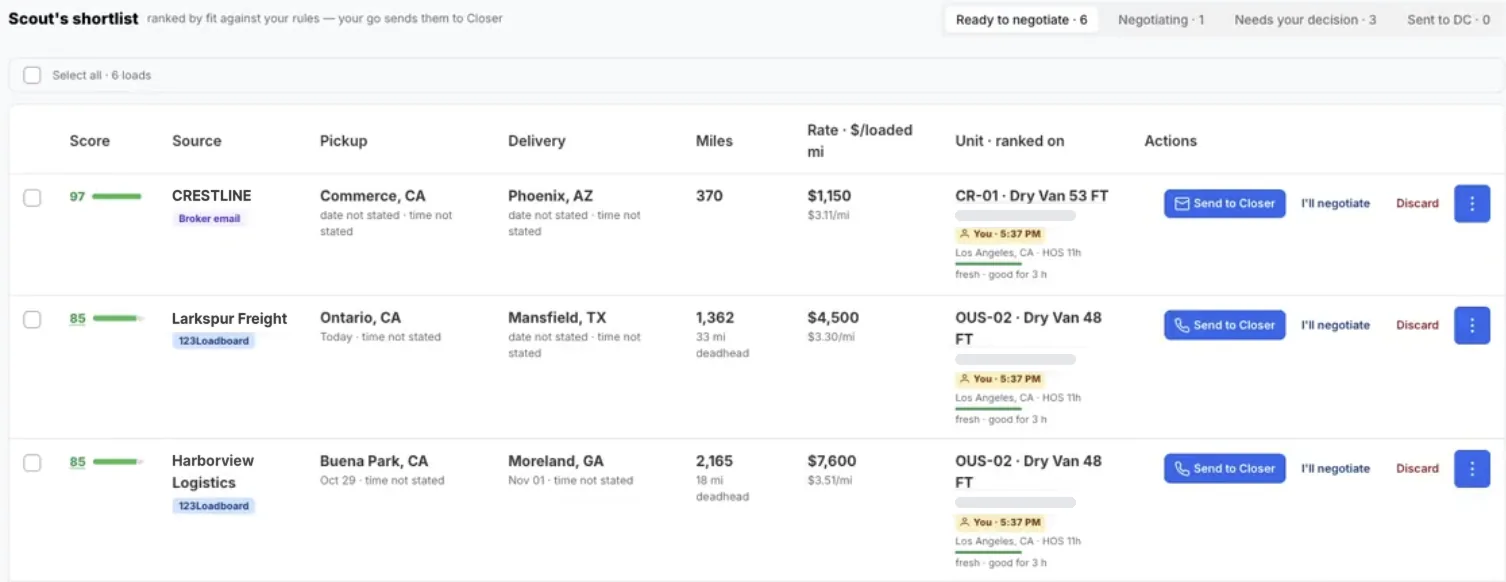
Open Load scouting, then Loadboards. Scout’s shortlist has four tabs: Ready to negotiate, Negotiating, Needs your decision and Sent to DC (Dispatch Center). Start with Needs your decision. Nothing in that tab moves until you act.
Each load there says which decision is holding it, and opens the place where you answer.
- A load flagged by Auditor names the cause and offers you a change of truck.
- A load with no truck offers Assign truck.
- A load you took over waits for you to close it or let it go.
The other three tabs need nothing from you. Ready to negotiate is what Scout found and your rules let through; Send to Closer starts the negotiation. Negotiating is what Closer is working now. Sent to DC is today’s hand-offs. If a load you expected isn’t there, choose Filtered out, above the shortlist: every dropped load is in it, with the reason. The screen below is ranked on two other trucks on the account, CR-01 and OUS-02, both in Los Angeles.
'%3E%3Ccircle cx='100' cy='96' r='82' fill='%23E0F7FA'/%3E%3Cpath d='M62 160 C55 118 60 68 72 50 C82 36 92 32 100 32 C108 32 118 36 128 50 C140 68 145 118 138 160 Z' fill='%237A4A26'/%3E%3Cpath d='M30 200C32 166 56 150 84 146L100 158 116 146C144 150 168 166 170 200Z' fill='%230891B2'/%3E%3Cpath d='M84 146 100 170 116 146 109 143 100 158 91 143Z' fill='%23FFF'/%3E%3Cpath d='M88 124V148C93 154 107 154 112 148V124Z' fill='%23F4D7BE'/%3E%3Cellipse cx='68' cy='95' rx='7' ry='10' fill='%23F4D7BE'/%3E%3Cellipse cx='132' cy='95' rx='7' ry='10' fill='%23F4D7BE'/%3E%3Cpath d='M70 89C70 59 84 43 100 43S130 59 130 89C130 115 117 135 100 135S70 115 70 89Z' fill='%23F4D7BE'/%3E%3Ccircle cx='89.5' cy='92' r='5' fill='%230B0B0B'/%3E%3Ccircle cx='111.5' cy='92' r='5' fill='%230B0B0B'/%3E%3Cpath d='M90 117C96 123 104 123 110 117' fill='none' stroke='%23C07463' stroke-width='5' stroke-linecap='round'/%3E%3Cpath d='M70 85 C70 57 84 41 100 41 C116 41 132 55 130 85 C122 65 110 57 94 59 C84 61 76 69 70 85 Z' fill='%237A4A26'/%3E%3C/g%3E%3C/svg%3E)
Load scouting
Needs your decision
- Houston, TX → Memphis, TNFlagged
The carrier’s insurance has a filed cancellation. Change the truck, or wait for the fix.
- Chicago, IL → Laredo, TXNo truck
Assign a truck to send it on.
- Houston, TX → Nashville, TNYours
You took this one over. Closer stopped and sent nothing more.
Step 2: Take over a negotiation, or stop it.
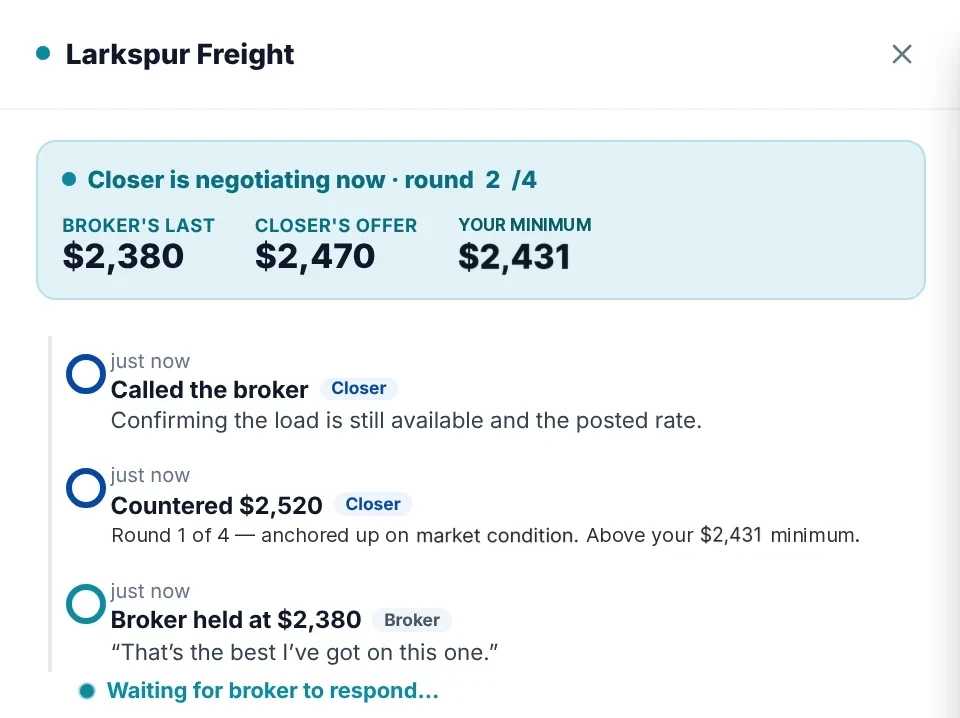
In the Negotiating tab, open a load’s actions and choose Take this one over. Closer stops at once and sends nothing more. The load moves to Needs your decision, still alive, and the confirmation shows the last figure Closer sent.
- Take this one over keeps the load. You finish it with the broker yourself.
- Stop negotiation, at the end of the same menu, cancels the load.
You don’t have to guess what was said. When a call ends you can play the recording with its transcript, and each retry has its own tab. Email threads can be read while they are live.
Closer never accepts under your minimum. If a broker’s best number is below it and you want the load anyway, that is a judgment call, and it is yours: take the load over and close it yourself.
Step 3: Authorize or reject a load.
Open Dispatch center. Every load Closer agreed and that waits on you is listed there as Ready to authorize. Open one, check the rate, the truck and the call, then authorize it or reject it.
- Before you authorize, you can change the truck.
- If the truck’s capacity has expired, authorizing stops until you confirm it is still true.
- When you authorize, Tiriel asks the broker for the rate confirmation with the carrier’s details, in the same email thread, and follows up until it arrives.
- When you reject, the load goes no further.
'%3E%3Ccircle cx='100' cy='96' r='82' fill='%23DDF7EC'/%3E%3Cpath d='M30 200C32 166 56 150 84 146L100 158 116 146C144 150 168 166 170 200Z' fill='%23059669'/%3E%3Cpath d='M84 146 100 170 116 146 109 143 100 158 91 143Z' fill='%23FFF'/%3E%3Cpath d='M88 124V148C93 154 107 154 112 148V124Z' fill='%23F0CDA6'/%3E%3Cellipse cx='68' cy='95' rx='7' ry='10' fill='%23F0CDA6'/%3E%3Cellipse cx='132' cy='95' rx='7' ry='10' fill='%23F0CDA6'/%3E%3Cpath d='M70 89C70 59 84 43 100 43S130 59 130 89C130 115 117 135 100 135S70 115 70 89Z' fill='%23F0CDA6'/%3E%3Ccircle cx='89.5' cy='92' r='5' fill='%230B0B0B'/%3E%3Ccircle cx='111.5' cy='92' r='5' fill='%230B0B0B'/%3E%3Cpath d='M90 117C96 123 104 123 110 117' fill='none' stroke='%23B46C5A' stroke-width='5' stroke-linecap='round'/%3E%3Cpath d='M70 83 C68 55 82 37 102 37 C120 37 134 51 130 83 C128 69 122 59 112 55 C100 57 86 59 78 67 C74 71 72 77 70 83 Z' fill='%231E1A17'/%3E%3Cpath d='M66 92 C62 40 138 40 134 92' fill='none' stroke='%231F2937' stroke-width='9' stroke-linecap='round'/%3E%3Cpath d='M58 84 h12 a4 4 0 0 1 4 4 v14 a4 4 0 0 1 -4 4 h-12 a4 4 0 0 1 -4 -4 v-14 a4 4 0 0 1 4 -4 Z M130 84 h12 a4 4 0 0 1 4 4 v14 a4 4 0 0 1 -4 4 h-12 a4 4 0 0 1 -4 -4 v-14 a4 4 0 0 1 4 -4 Z' fill='%231F2937'/%3E%3C/g%3E%3C/svg%3E)
LD9W955
Laredo, TX → Memphis, TN · Harborview
- Posted
- $2,712
- Agreed
- $2,918 +$206
- Truck
- 118 · Manuel
- Negotiation
- Recorded call · 2m 04s
After your yes
You authorize
The rate con is requested from Harborview
It is audited, field by field
Booked Loads
Step 4: Fix a rate con that doesn’t match.
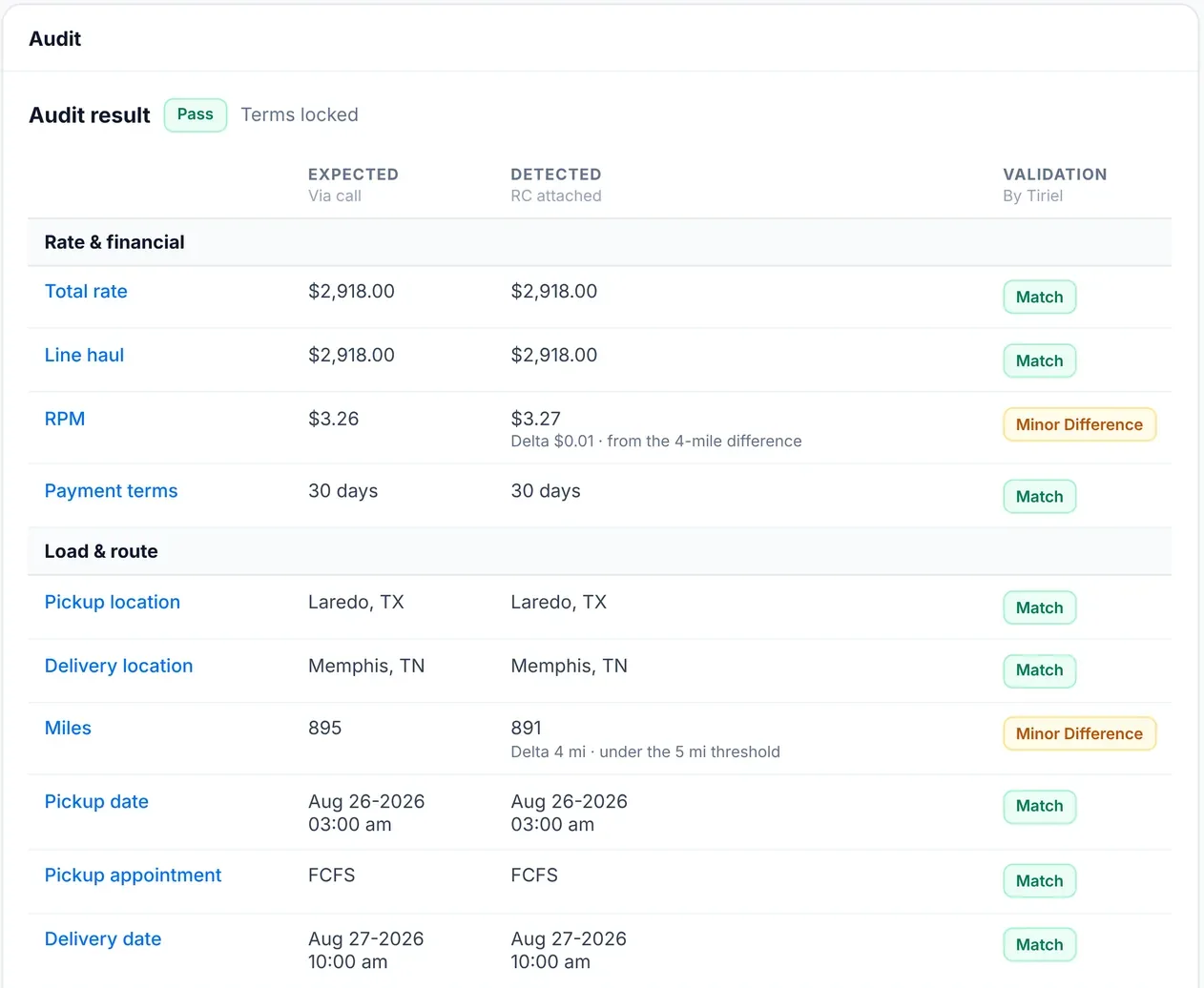
When the rate con arrives, it is read field by field against what was agreed on the call. If it matches, the load moves to Booked Loads and you do nothing. If it doesn’t, the load holds and you choose in Dispatch center: Tiriel emails the broker for an updated rate con and tells you when the load is ready to authorize, or you discard the load.
The result tells a rate con that doesn’t match apart from one that couldn’t be read. You also see each version the broker sent, any hold he asked for, and his replies. Then you have two answers:
- Go fix it. Tiriel emails the broker in the same thread, lists each field that differs and asks for an updated rate con. When it arrives it is audited again, and you’re told the load is ready to authorize.
- Discard the load. The broker is told.
Closer checks every field of the rate con against what was agreed on the call or posted on the board: the rate, the stops and dates, equipment and weight, accessorials and TONU. Auditor checks who the rate con is made out to: the carrier, MC and DOT. A field with nothing agreed is shown to you, not passed. The load holds until the paper matches.
| Field | Rate con | Result |
|---|---|---|
| Rate | $2,350 | $100 short |
| Carrier and MC | Yours | Match |
| Pickup and delivery | As agreed | Match |
The load is holding. Ask the broker for an updated rate con, or discard the load.
Step 5: Answer a warning, a review or a block.
When a broker, a carrier or a load is flagged, read which of three it is. A Warn you may override. A Review is yours to resolve before pickup. A Block is the strongest flag, and it comes to you with the evidence. Each one names the fact behind it, not just a status.
- Warn. Something is off, and you decide. If you override it, the override is recorded with who did it and when.
- Review. Evidence is missing or two sources disagree. Supply what is asked for.
- Block. No authority to operate, a broker without an active bond, or a revoked authority. It is the strongest flag, and it comes to you right away with the evidence.
You see it where you already work. The broker list shows the decision. The carrier’s profile shows each finding and where it came from. A flagged load shows the flag and its reason, such as “MC not in the register”. When a load is flagged because of its carrier, it is checked again on its own once the carrier is clean.
Step 6: Get a truck moving again.
Open Fleet. Each truck shows its capacity state and the reason under it. A truck that isn’t Ready names what it is waiting on, and most of the time the fix is one action from you.
- Planner couldn’t reach the driver. The truck’s card lists Planner’s last three calls and how each one failed: nobody answered, it didn’t ring, the number is no good, or someone answered and nothing was captured. Enter the capacity yourself. If the number is wrong, the new one needs the driver’s consent again.
- Capacity has expired. Confirm it is still true, or enter it again. While it is expired, Search loads on the carrier’s page reads Search anyway.
- The driver hasn’t answered, or said no. Send him the same link again and call him yourself. You can still type the truck’s capacity.
- The truck reads Held. The view states every cause, as Auditor flagged it. Planner and the ELD don’t fill its capacity while it is held; you decide whether to fix the cause or enter the capacity yourself.
- Nothing is being found. Check the Scout page. A load board account that reads Disconnected searches nothing until you choose Reconnect in its menu.
'%3E%3Ccircle cx='100' cy='96' r='82' fill='%23FFE4E8'/%3E%3Cpath d='M30 200C32 166 56 150 84 146L100 158 116 146C144 150 168 166 170 200Z' fill='%23E11D48'/%3E%3Cpath d='M84 146 100 170 116 146 109 143 100 158 91 143Z' fill='%23FFF'/%3E%3Cpath d='M88 124V148C93 154 107 154 112 148V124Z' fill='%23EDC8A2'/%3E%3Cellipse cx='68' cy='95' rx='7' ry='10' fill='%23EDC8A2'/%3E%3Cellipse cx='132' cy='95' rx='7' ry='10' fill='%23EDC8A2'/%3E%3Cpath d='M70 89C70 59 84 43 100 43S130 59 130 89C130 115 117 135 100 135S70 115 70 89Z' fill='%23EDC8A2'/%3E%3Cpath d='M73 101 C75 127 90 139 100 139 C110 139 125 127 127 101 C121 116 112 123 100 123 C88 123 79 116 73 101 Z' fill='%234A3221'/%3E%3Cpath d='M88 114 C94 110 106 110 112 114 C106 116 94 116 88 114 Z' fill='%234A3221'/%3E%3Ccircle cx='89.5' cy='92' r='5' fill='%230B0B0B'/%3E%3Ccircle cx='111.5' cy='92' r='5' fill='%230B0B0B'/%3E%3Cpath d='M92 119C97 123 103 123 108 119' fill='none' stroke='%23B06A57' stroke-width='4.5' stroke-linecap='round'/%3E%3Cpath d='M71 81 C70 53 84 39 100 39 C117 39 130 53 129 81 C126 65 118 55 100 55 C84 55 75 65 71 81 Z' fill='%234A3221'/%3E%3Cpath d='M66 92 C62 40 138 40 134 92' fill='none' stroke='%231F2937' stroke-width='9' stroke-linecap='round'/%3E%3Cpath d='M58 84 h12 a4 4 0 0 1 4 4 v14 a4 4 0 0 1 -4 4 h-12 a4 4 0 0 1 -4 -4 v-14 a4 4 0 0 1 4 -4 Z M130 84 h12 a4 4 0 0 1 4 4 v14 a4 4 0 0 1 -4 4 h-12 a4 4 0 0 1 -4 -4 v-14 a4 4 0 0 1 4 -4 Z' fill='%231F2937'/%3E%3C/g%3E%3C/svg%3E)
Truck 118 · Manuel
Fleet
Planner’s last three calls
- Nobody answered.
- Nobody answered.
- Someone answered. Nothing was captured.
What always comes to you.
Some decisions are never an agent’s, whatever you set.
- A lumper. Tiriel never pays, authorizes or refuses a lumper. Who pays is your call.
- A counteroffer below your limits. Closer stops at your minimum.
- A broker you want to walk away from. You can pause one, or reject the load.
- A rate con that doesn’t match. Closer shows you each field that differs. You choose: Tiriel emails the broker for an updated rate con and tells you when the load is ready to authorize, or you discard the load.
What happens next.
Whatever you decide leaves a record beside the evidence it was based on: the call recording, the email, the rate con. A load whose rate con is approved sits in Booked Loads. From there, Coordinator runs it through POD, and Expeditor prepares the detention and TONU claims with the evidence attached and leaves them ready to send in one click.